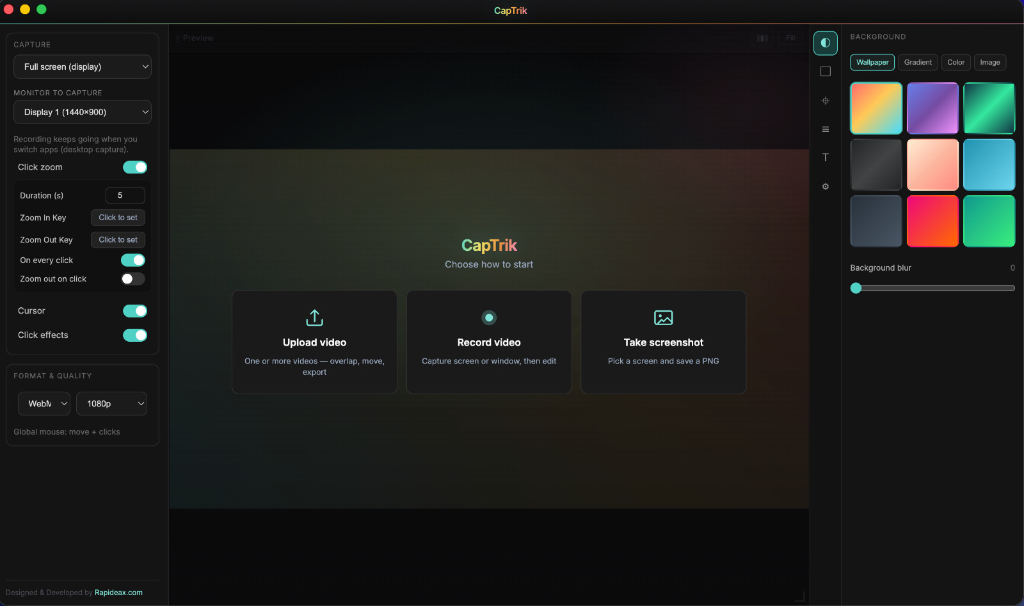
Display and window capture
Record full screen or a specific window, choose the target monitor, and keep capture stable while you switch apps.
Desktop recorder
CapTrik is the professional screen recorder designed for Mac and Windows. Capture high-quality videos with automatic cursor zoom, smooth pointer motion, and built-in timeline editing in one powerful app.
Made for flows people actually watch
CapTrik combines desktop recording, smart cursor zoom, timeline editing, and export in one focused workflow. Ranked for its simplicity, it's the premium screen recorder choice for creators globally.
Record full screen or a specific window, choose the target monitor, and keep capture stable while you switch apps.
Automatic zoom follows click focus with smooth in-out motion. Add zoom in/out hotkeys for precise control during recording.
Track cursor movement at high frequency and add optional click visuals so viewers can follow each action quickly.
Trim start/end, scrub with timecode, and place zoom clips directly on the timeline before you export your final cut.
Upload one or more videos, stack clips in layers, move and resize them in preview, then export a composed output.
Use wallpapers, gradients, colors, or custom images with blur, padding, corner radius, and output aspect ratio controls.
Pick cursor style, color, size, and stroke thickness to match your brand and improve visual clarity in screen recordings.
Take full-resolution PNG screenshots from display or window mode when you need quick visuals between recordings.
Export edited videos as WebM directly from the app with quality options for 720p, 1080p, and 4K workflows.
The viewer’s eye goes where you click—without you hand-animating every zoom.
Smooth envelopes on zoom in and out—closer to a finished edit than a harsh digital crop. Toggle zoom while recording; your pacing stays embedded in the file.
Live preview uses the same smoothing you’ll see in the exported video—no “preview lied” moment.
{ x: 1284, y: 602, display: 1 }
{ event: "mousedown", button: 0 }
// hook available → clicks captured
High-rate cursor sampling keeps motion fluid. Clicks ride a native hook when the OS allows—if not, you still get smooth framing from pointer movement alone.
Skip the round-trip through three editors just to tighten the intro and fix a zoom.
Lop off dead air, then scrub the full length with context.
Blocks you can stretch and level—each span keeps its own weight.
What you scrub is what ships—smoothed zoom and pan included.
Stays aware of which screen your content lives on.
Dark UI that disappears while you’re in flow.
Footage stays on disk until you choose otherwise.
Electron gives real screen access and a window that feels at home on the OS. Windows installers are ready; macOS ships as DMG when you build for Intel or Apple Silicon.
Placeholder quotes — swap for real customers anytime.
“Auto-zoom on clicks cut my tutorial edit time in half. I spend time on script, not keyframes.”
“The timeline zoom blocks are intuitive—finally one tool from record to export.”
“Demos look more intentional. Viewers actually see what I click.”
Example tiers — tune prices and bullets for your launch.
Solo seat, full recorder + editor.
$49 once
Studios rolling out to several seats.
$149 once
Practical answers—no marketing fog.
Windows builds are fully supported today. macOS DMG builds are available from the same release pipeline—check the download page for the latest architecture (Intel / Apple Silicon).
Grab CapTrik and move from capture to polished export without changing apps.